Understand the workspace
The main workspace keeps receiver controls, signal displays, station tools, and status information in one window.
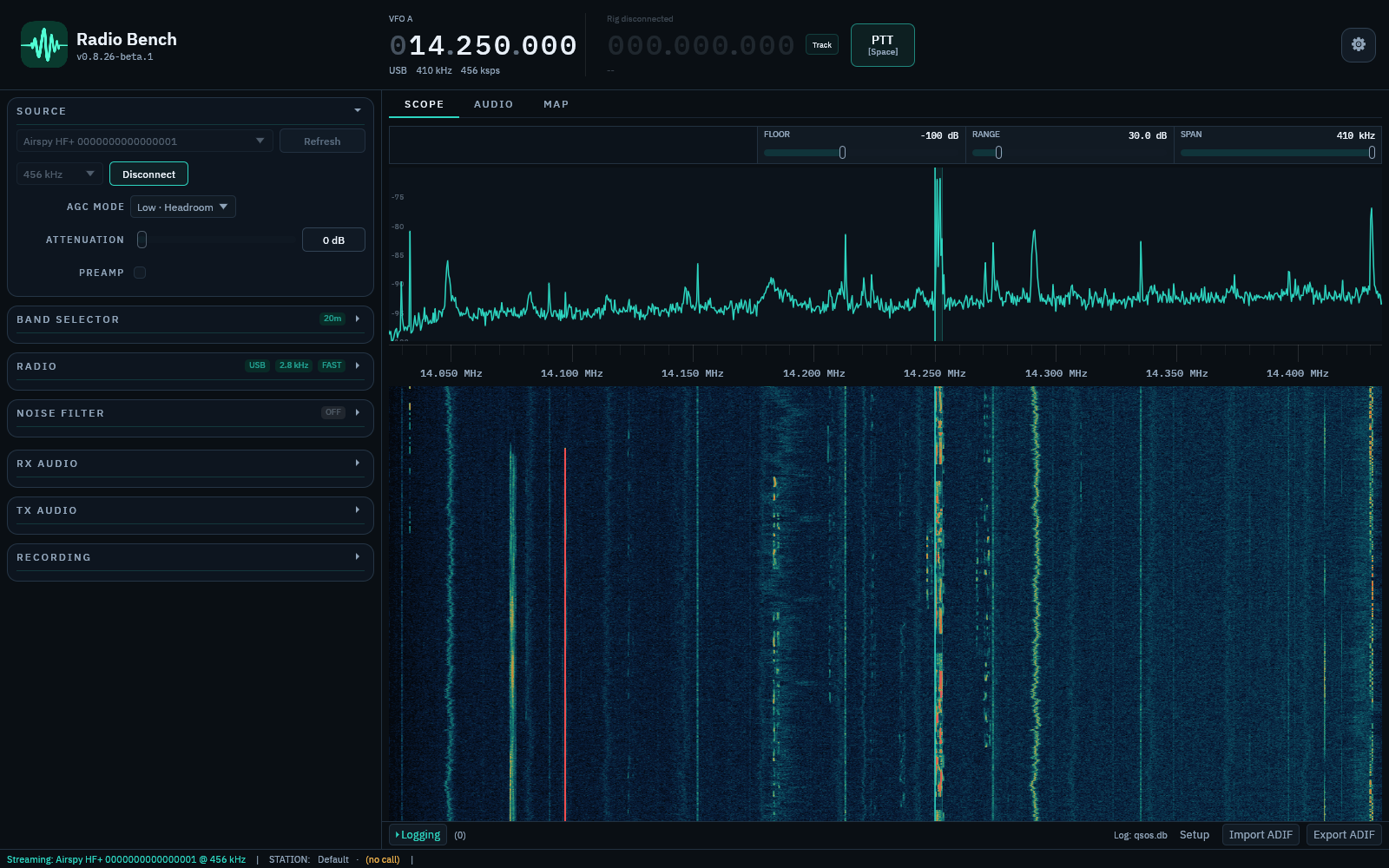
Signal display
The spectrum and waterfall show the captured frequency span. Select or drag in the display to tune. The VFO marker shows the tuned frequency and receiver passband.
See spectrum and waterfall for display controls and interpretation.
Control column
The left column holds collapsible sections. SOURCE selects and starts the SDR, and RADIO selects mode, passband, AGC, and receiver processing.
BAND SELECTOR, NOISE FILTER, RX AUDIO, TX AUDIO, and RECORDING hold the remaining receiver and station controls. Select a section header to open it.
Tabs and station tools
The SCOPE, AUDIO, and MAP tabs change the main display. The QSO logger opens as a drawer below the display.
The top bar holds the frequency display, the rig readout, and the PTT control. Open Settings with the button at the top right.
Status information
The status bar reports streaming, recording, CAT, and diagnostic state. A notification explains an action that failed or needs attention.
Open Settings to configure the application. Settings are grouped by function and persist between sessions.